Accounting for Canadian small businesses
Your business finances. Finally, under control.
Simple accounting, invoicing and inventory management for Canadian small businesses. Track sales, expenses, inventory and taxes in one place.
No complicated ERP. No unnecessary features. Just the tools you need to run your business.
Free during early access. No credit card. The demo needs no account.
The real product
One place for the numbers that run your business
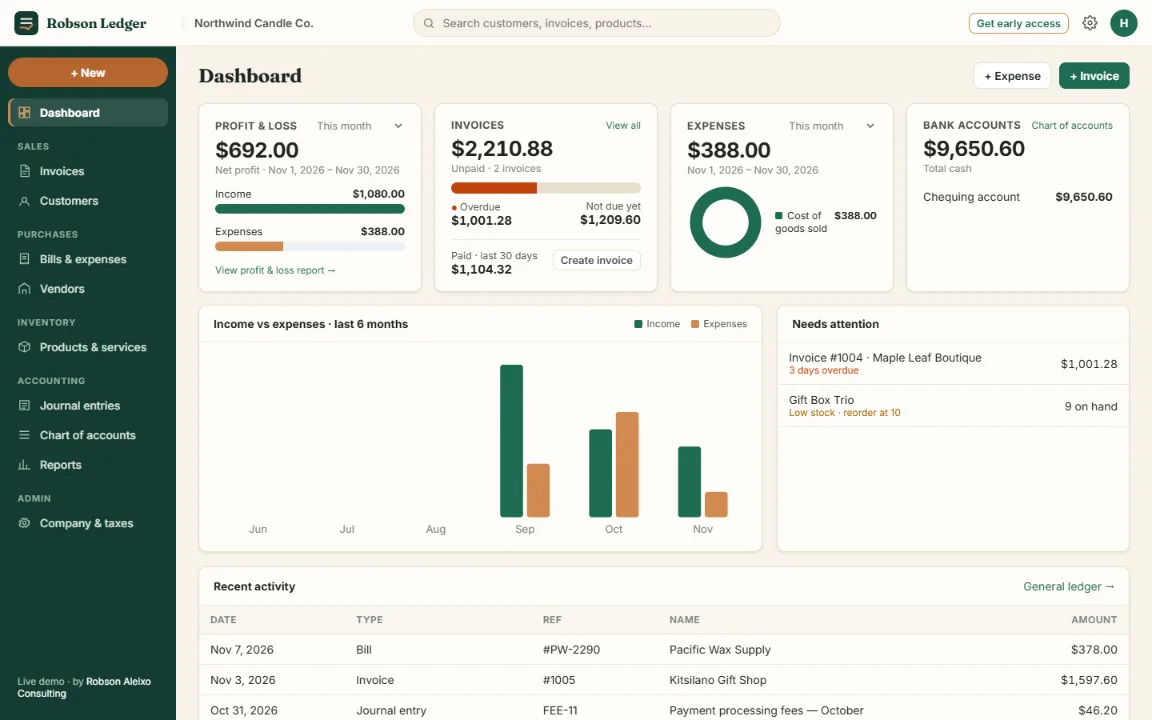
These are screenshots of Robson Ledger itself, taken from the live demo with sample data. Open the demo to click through every screen.
See where you stand
Profit, unpaid invoices, expenses and cash on one screen, with what needs your attention today.
- Profit & loss for the month
- Overdue and upcoming invoices
- Low-stock alerts
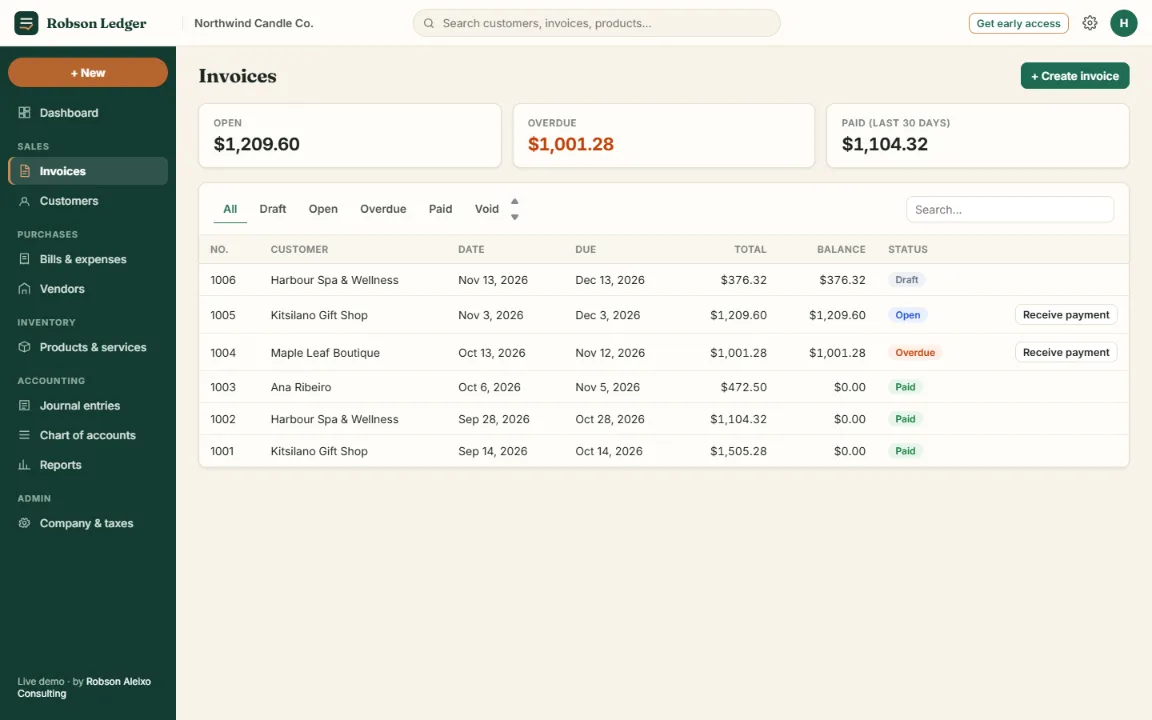
Get paid on time
Create invoices with your sales taxes applied, then follow each one from draft to paid.
- Draft, open, overdue and paid at a glance
- Record customer payments
- Download, print or save as PDF
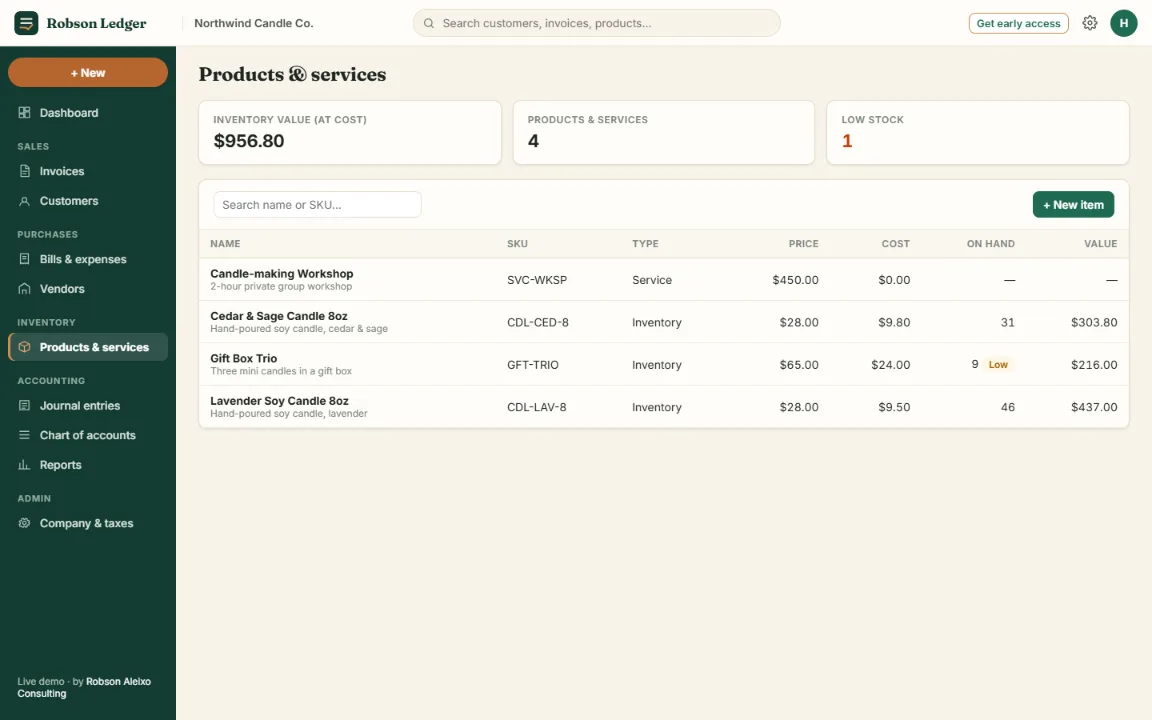
Know what’s on the shelf
Track products and services, quantities on hand and what your stock is worth.
- Quantity on hand and unit cost
- Reorder points and low-stock flags
- Inventory value at cost
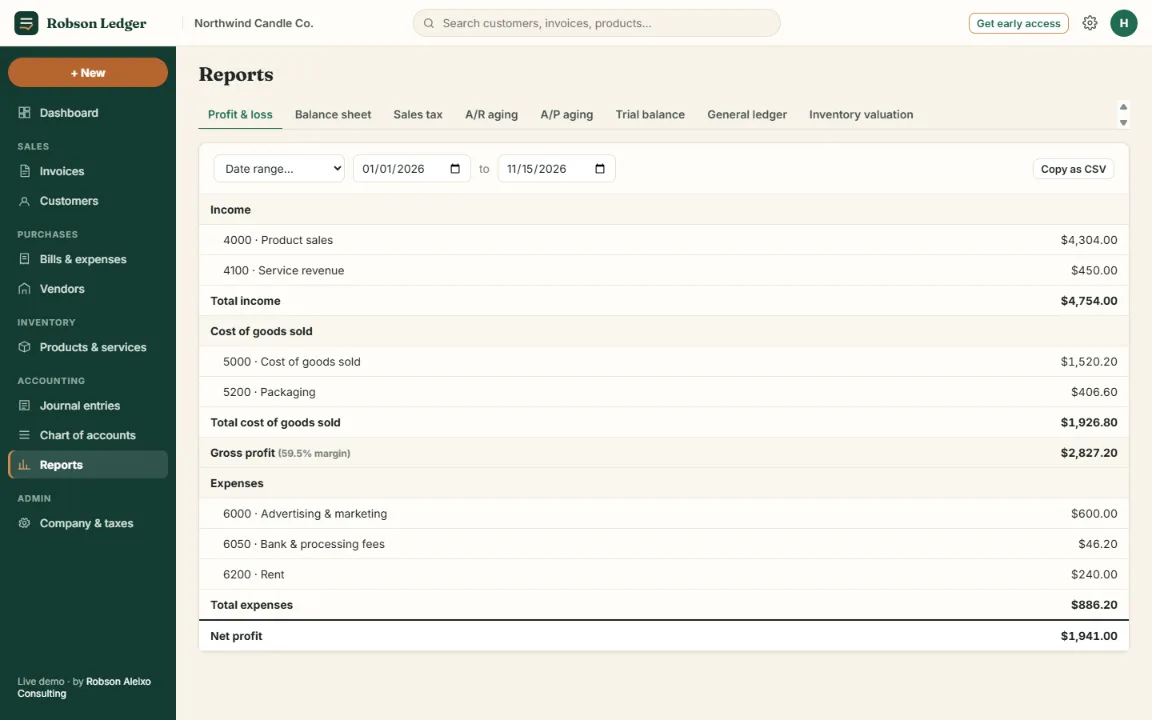
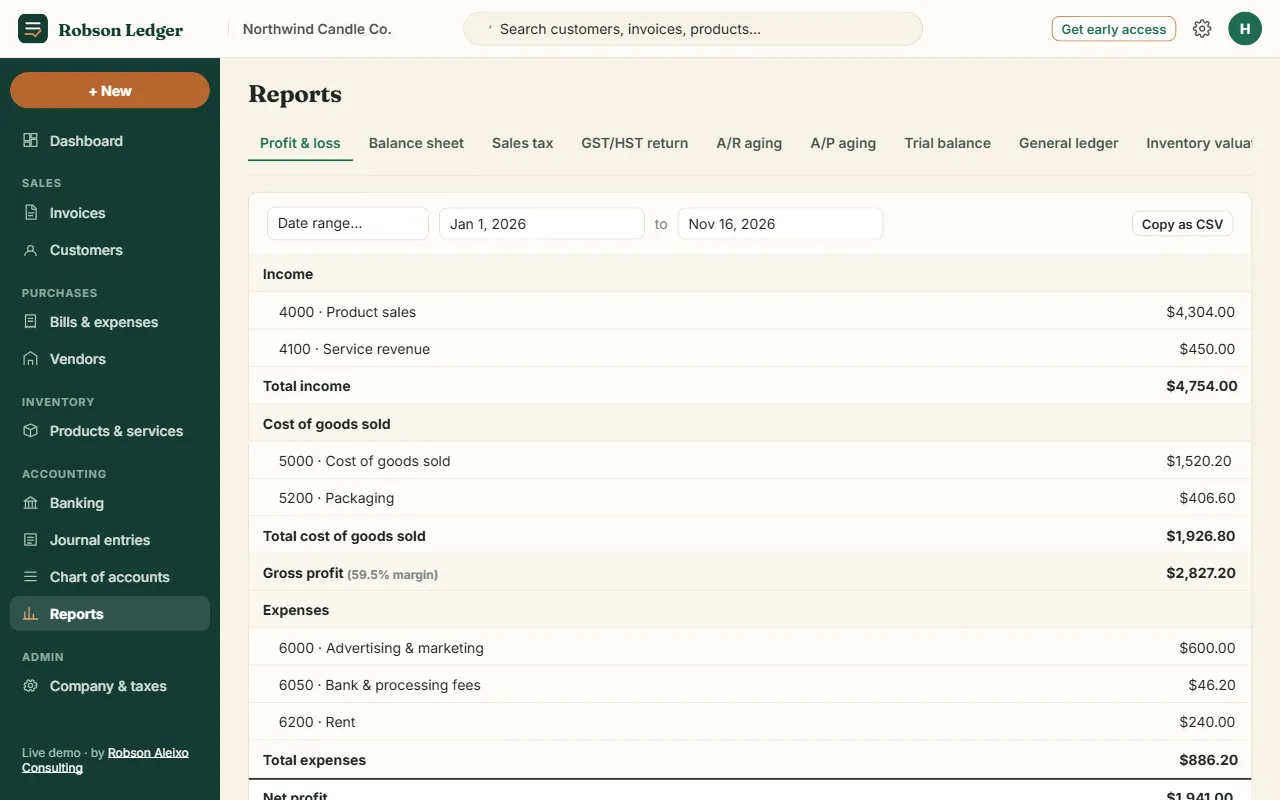
Reports your accountant expects
Every invoice, bill and payment posts to double-entry books, so your reports always balance.
- Profit & loss and balance sheet
- Sales tax, A/R and A/P aging
- Copy or download reports as CSV
Features
What you can do today
Everything listed here works in the app right now. Nothing on this page is a promise of a future feature.
01
Accounting
Proper double-entry bookkeeping without needing to think in debits and credits.
- Chart of accounts ready for a small business
- Bills, expenses and vendor payments
- Journal entries for adjustments
- General ledger and trial balance
- Bank statement import (CSV, OFX), matching and reconciliation
02
Invoicing
Professional invoices with your business details and tax number.
- Customers, products and services on each line
- Payment terms and due dates
- Record customer payments
- Print or save invoices as PDF
03
Inventory
Stock levels update as you buy and sell.
- Purchases on bills add to stock
- Sales reduce stock and record cost of goods sold
- Reorder points with low-stock alerts
- Inventory valuation report
04
Canadian tax
Choose your province and your sales taxes are set up for you.
- GST, HST, PST and QST presets by province
- Input tax credits tracked separately
- GST/HST return worksheet (lines 101 to 109)
- GST/HST number printed on invoices
Reports
Straight answers
What’s included, and what isn’t yet
Robson Ledger is in early access. Here is an honest account of where it stands.
Included today
- Invoices and customer paymentsAvailable
- Bank statement import and reconciliationAvailable
- Bills, expenses and vendorsAvailable
- Products, services and inventoryAvailable
- GST, HST, PST and QSTAvailable
- GST/HST return worksheetAvailable
- Nine financial reportsAvailable
- English, French, Portuguese and SpanishAvailable
- Works on phone, tablet and desktopAvailable
Not available yet
- Emailing invoices from the appPlanned
- Accountant and team accessPlanned
- Recurring transactionsPlanned
- Estimates and credit notesPlanned
Security and privacy
Your records stay yours
The facts about how your data is handled, without the marketing.
Stored in Canada
Account data is stored with Supabase in its Canada (Central) region.
Encrypted connections
The website and the app use encrypted HTTPS connections.
Sign-in required
Your records can’t be read without signing in. Accounts are confirmed by email, and password resets go to that email.
Demo stays on your device
The live demo runs in your browser. Nothing you type in it is sent to us.
Pricing
Free while in early access
Use the full product at no cost while Robson Ledger is in early access, and help shape what comes next.
Early access
$0 during early access
- Every feature available today
- One company per account
- All nine reports, including the GST/HST return worksheet
- Direct line to the person building it
After early access
Paid plans have not been set yet. Prices will be published on this page before any paid plan starts.
Early-access users will be told in advance by email. No one will be charged without choosing a plan first.

About Robson
Built on real-world business systems experience
Robson Ledger is built by Robson Aleixo, a Vancouver-based project manager who has spent more than ten years implementing business systems: NetSuite ERP at Oracle Canada, hospitality systems at Infor and point-of-sale at Vivonet.
Those projects showed the same pattern again and again. Small businesses were either outgrowing spreadsheets or paying for an ERP far bigger than they needed. Robson Ledger is the middle ground: real accounting, built for how Canadian small businesses actually work.
FAQ
Questions, answered
What is Robson Ledger?
Online accounting software for small businesses. It covers bookkeeping, invoicing, bills and expenses, inventory, Canadian sales taxes and financial reports, all in your web browser.
Who is it for?
Canadian small businesses and self-employed people who sell products or services, such as makers, retailers, studios and service providers, and who want proper books without the complexity of an ERP.
Is it made for Canada?
Yes. It is built in Vancouver, works in English, French, Portuguese or Spanish, uses Canadian dollars, has sales tax presets for every province and territory, and stores account data in Canada.
Does it handle GST, HST, PST and QST?
Yes. Choose your province and the right taxes are set up: GST, HST, GST plus PST, or GST plus QST. You can edit rates and add taxes. Input tax credits are tracked, and the GST/HST return worksheet fills in lines 101 to 109 of your return for any period. Filing your return is still done with the CRA or Revenu Québec.
Can I track inventory?
Yes. Mark a product as inventory to track quantity on hand and cost. Bills add stock, invoices remove it and record cost of goods sold, and reorder points flag low stock on your dashboard.
Can my accountant access it?
Not yet. Accountant and team access is planned. Today you can share reports by downloading them as CSV, or print and save invoices as PDF.
How do I get started?
Click Start Free, create an account with your email and a password, confirm your email, and enter your business name and province. You can also explore the live demo first, no account needed.
Is early access really free?
Yes. There is no charge and no credit card during early access. Paid plans have not been set yet; they will be announced on this site and by email before they start, and no one is charged without choosing a plan.
How is my data protected?
Connections are encrypted with HTTPS, account data is stored with Supabase in Canada, and your records can only be read after you sign in. The live demo keeps everything in your own browser.
Get your books under control
Free during early access. Set up in a few minutes.